Let’s be honest: taking notes on YouTube videos is usually a frustrating experience.
You open a 2-hour technical lecture or coding tutorial. You hit play. Thirty seconds in, the speaker shares a golden insight. You scramble to pause the video, switch tabs to Notion or Google Docs, frantically type what you remembered, and switch back.
Ten minutes later, you’ve paused 25 times, lost your flow state, and still can’t find where that specific diagram was when you need it a week later.
In 2026, you shouldn't have to choose between watching a video and retaining what you learn.
Modern AI YouTube note-taking tools have evolved far beyond generic 1-click summaries. The best tools capture live transcripts, sync timestamps to the exact second, let you chat with the video’s content, and embed playable video clips directly into your notes.
We tested over 20 top-rated YouTube note-taking tools and Chrome extensions across criteria like transcription accuracy, editor flexibility, playback synchronization, AI capabilities, and price.
Here are the 6 best AI YouTube note-taking tools in 2026, ranked and reviewed.
📊 Quick Comparison
Tool | Best For | Chrome Extension | Embedded Video Clips | In-Context AI Chat | Rich-Text Block Editor | Starting Price |
|---|---|---|---|---|---|---|
Best Overall Smart Notebook | ✅ Yes | ✅ Playable Moments & | ✅ Yes (Video + Notes) | ✅ Yes | Free tier / Pro available | |
| Notion & Obsidian Sync | ✅ Yes | ❌ Link timestamps only | ⚠️ Basic | ⚠️ Markdown export | Free (5 vids) / $4/mo |
| Flashcards & Fast Summaries | ✅ Yes | ❌ Screenshots only | ✅ Yes | ⚠️ Basic notes | Free tier / $9.99/mo |
| 8-Bullet TL;DR Summaries | ✅ Yes | ❌ No | ❌ No | ❌ No editor | Free trial / $4.99/mo |
| Non-disruptive Sidebar Q&A | ✅ Yes | ❌ No | ✅ Yes | ⚠️ Simple text | Free tier / $8/mo |
| College Lectures & Audio | ❌ Web/App | ❌ No | ✅ Yes | ⚠️ Study dashboard | Free trial / $9.99/mo |
1. Annotate.tv: Best for Exporting Timestamped Notes to Notion & Obsidian
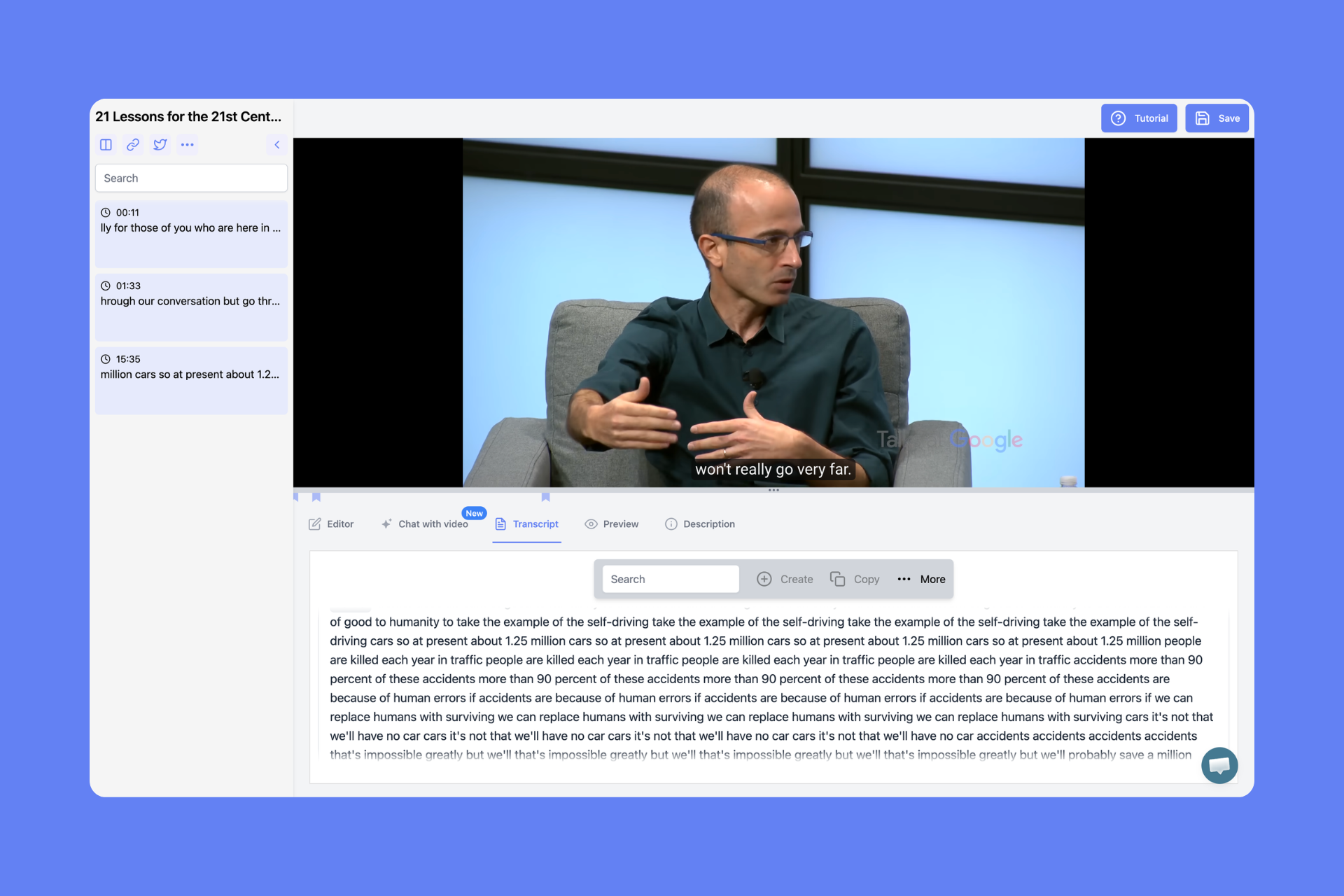
If your entire life is already hard-wired into Notion or Obsidian and you exclusively want a bridge that sends timestamped bullet points into your existing databases, Annotate.tv is a reliable specialist.
Standout Features:
Two-Way Video Sync: Click any timestamp in your notes to jump the YouTube video directly to that second.
Native PKM Integrations: Automatically syncs your notes and captures directly to Notion databases, Obsidian markdown vaults, and Readwise.
Clean Sidebar Interface: A minimal sidebar that docks neatly against the YouTube video player.
Pros:
✅ Direct automated sync to Notion, Obsidian, and Readwise.
✅ Clean, minimalist interface with low cognitive overhead.
✅ Easy keyboard shortcuts for timestamp creation.
Cons:
❌ Lacks deep in-editor AI synthesis or interactive video clipping.
❌ Free tier is strictly limited to 5 videos total.
❌ No multi-source support (you cannot combine web articles or audio files in the same note).
Best For: Dedicated Obsidian and Notion power users who just want raw timestamps synced to their existing vault.
2. NoteGPT: Best for Quick AI Flashcards & Knowledge Cards
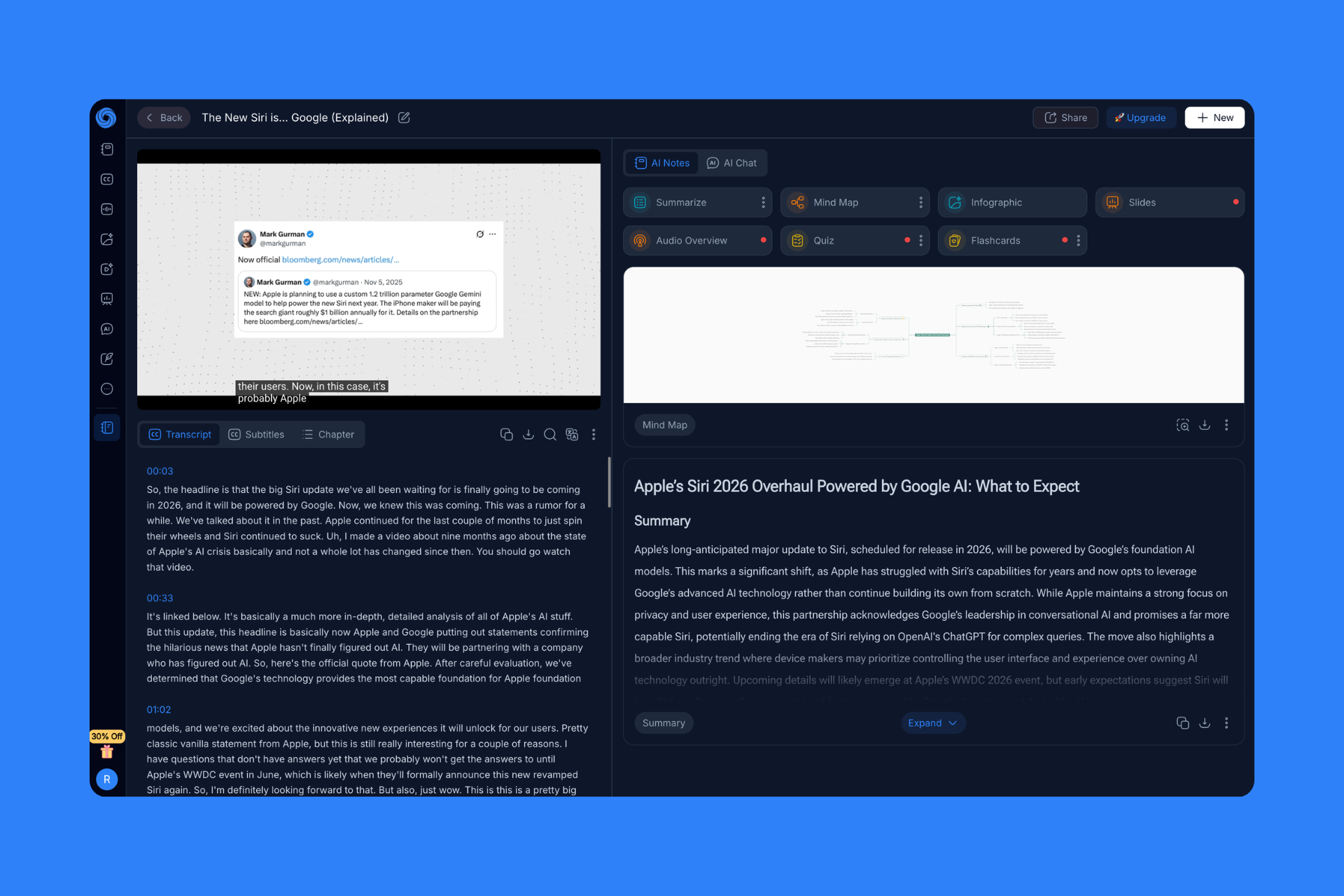
NoteGPT is a feature-rich AI summarizer designed specifically for students who want automated study aids like quizzes, flashcards, and mind maps generated from educational videos with zero manual effort.
Standout Features:
AI Quiz & Flashcard Generator: Automatically generates active recall question decks from video transcripts.
Mind Map Visualizer: Converts structured video outlines into a visual node tree.
Multi-Format Ingestion: Supports YouTube videos, PDFs, and web articles.
Pros:
✅ Excellent automated flashcard generation for exam prep.
✅ Mind map feature helps visualize lecture hierarchies.
✅ Generous free daily quota for basic summaries.
Cons:
❌ AI summaries can feel generic and repetitive on complex, nuanced topics.
❌ Note editor is basic and lacks rich block media embedding.
❌ Heavy UI with frequent upgrade banners.
Best For: High school and college students cramming for exams who need quick flashcards generated from recorded lectures.
3. Gistr: The Best Overall AI-Native Smart Notebook for Video & Web Learners
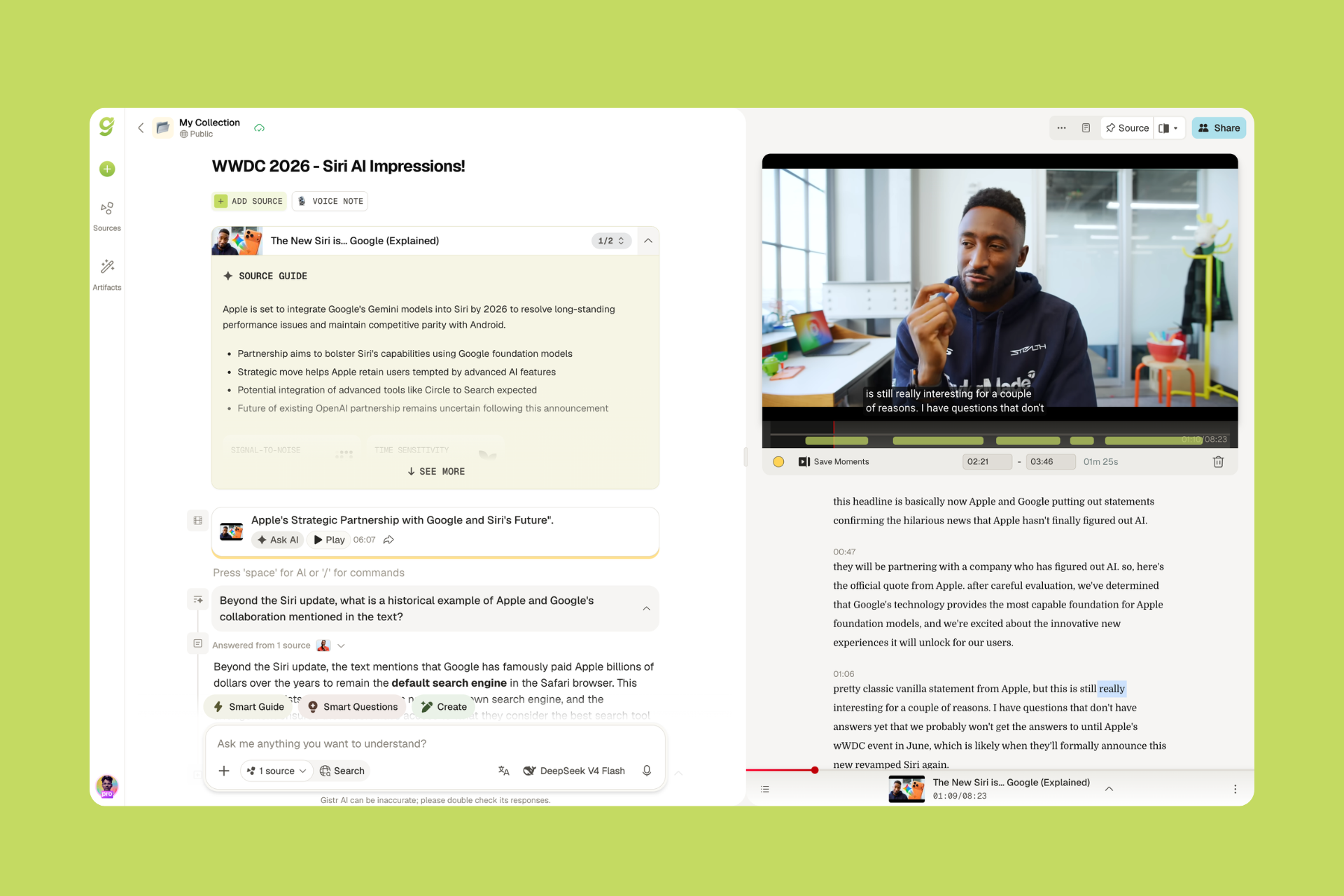
While almost every other tool on the market just dumps a static bulleted summary into a clipboard, Gistr seamlessly bridges video playback, synced transcripts, voice dictation, and rich-text editing into one continuous workspace.
What Makes Gistr Stand Out:
Interactive Playable "Moments": Instead of pasting a static timestamp link or a flat screenshot, Gistr allows you to clip a 30-second explanation and embed it as a live, playable video snippet node inside your notes. You can replay the exact clip without leaving your document.
Rich-Text Editor: Gistr features a state-of-the-art Notion-like block editor with slash commands (
/ai,/clip,/voice,/callout,/code).Multi-Source Synthesis Threads: Don’t isolate your learning. In a single Gistr thread, you can combine a 2-hour YouTube talk, a technical blog post, and a podcast recording into one cohesive research document.
In-Editor Voice Notes: Watching a complex concept and want to speak your mind? Tap the microphone button in the editor. Gistr records, transcribes, and formats your spoken commentary right beside the video.
Contextual "Ask AI": Chat directly with the video transcript to extract mental models, generate quiz questions, or explain complex jargon in simple terms.
Public Digital Garden: Ready to share your knowledge? Publish your threads into a beautifully styled digital garden with one click.
┌────────────────────────────────────────────────────────────────────────────┐
│                             The Gistr Difference                           │
├──────────────────────────────────────┬─────────────────────────────────────┤
│ ❌ Standard AI Summarizers           │ ✅ Gistr Smart Notebook             │
├──────────────────────────────────────┼─────────────────────────────────────┤
│ • Generic 1-click bullet points      │ • Interactive playable video clips  │
│ • Forget 90% after closing tab       │ • Active retention & rich writing   │
│ • Locked to text-only summaries      │ • Multi-source (Video, Web, Voice)  │
│ • No long-term knowledge retention   │ • Permanent Digital Garden wiki     │
└──────────────────────────────────────┴─────────────────────────────────────┘
Pros:
✅ Embeds playable video clips directly into your note documents.
✅ Powerful browser extension with non-intrusive sidebar capture.
✅ Multi-source support (YouTube + Web articles + Audio/Podcasts + Voice notes).
✅ High-performance block editor with markdown & slash command support.
✅ Seamless public sharing and digital garden publishing.
Cons:
⚠️ Power-packed feature set might have a slight learning curve compared to single-click popup extensions.
Best For: Students, software engineers, content creators, researchers, and lifelong learners who want to turn video consumption into a permanent, searchable second brain.
4. Eightify: Best for 60-Second Executive Bullet Summaries
If you don’t care about taking notes and simply want to know whether a 45-minute podcast or tech review is worth your time before clicking play, Eightify is the fastest TL;DR extension available.
Standout Features:
8 Key Takeaways in Seconds: Condenses any video into 8 clean, digestible bullet points with emojis.
Timestamped Chapter Breakdowns: Breaks longer videos into categorized sub-sections with direct jump links.
Mobile iOS App: Share any YouTube link from the mobile YouTube app to get an instant summary.
Pros:
✅ Extremely fast summary generation (usually under 5 seconds).
✅ High-quality formatting for executive skimming.
✅ Mobile app integration for on-the-go summaries.
Cons:
❌ Not a note-taking tool - there is no document editor or note management.
❌ No interactive AI chat with the video.
❌ Requires a paid subscription after a short free trial.
Best For: Busy executives, investors, and casual viewers who want to filter through video clickbait in 30 seconds.
5. MensorAI: Best for Non-Disruptive In-Sidebar Video Q&A
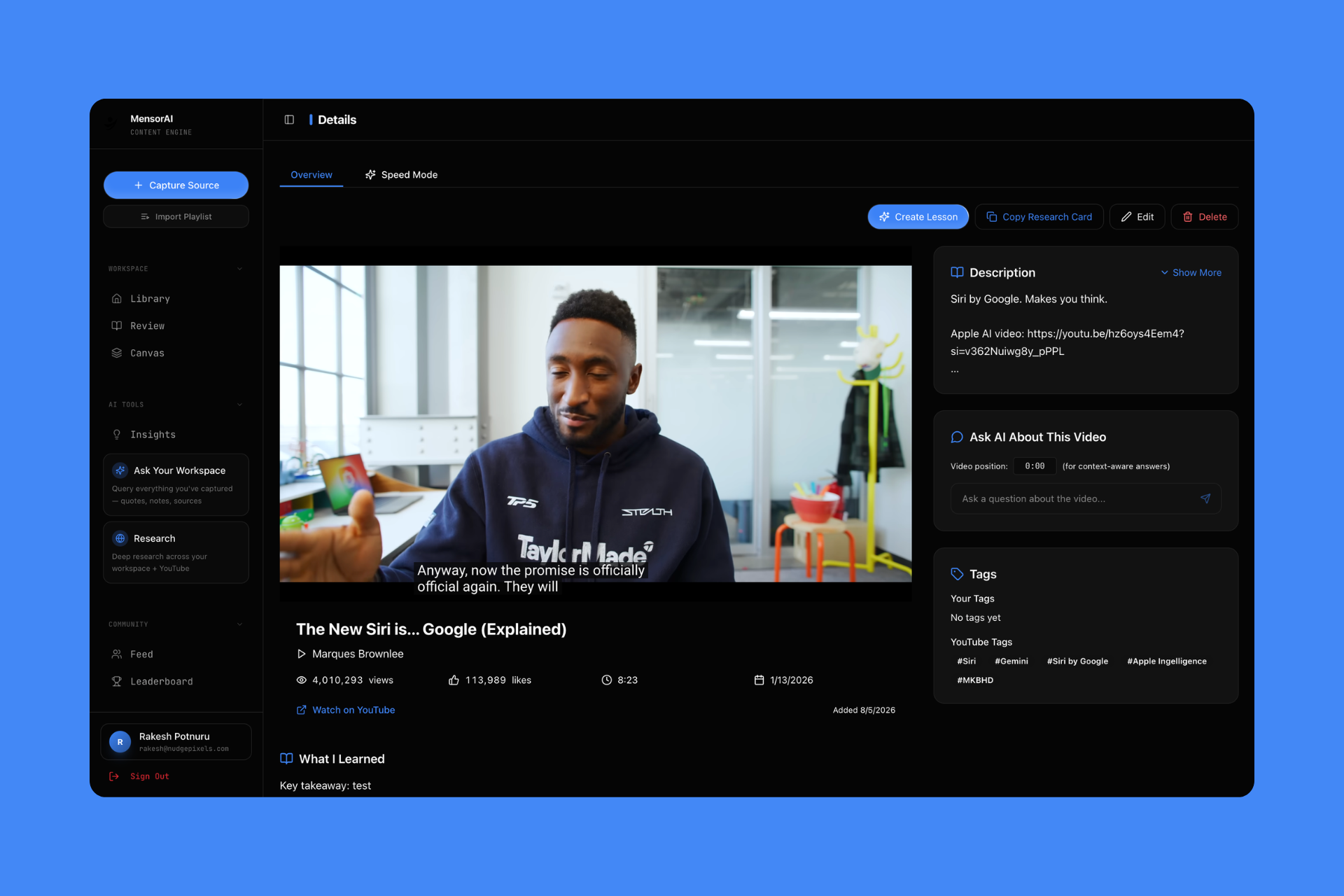
MensorAI is a sleek Chrome extension designed to live quietly inside your browser sidebar, allowing you to ask specific questions about what the speaker is saying without pausing playback.
Standout Features:
Sidebar Copilot: Opens a clean floating drawer over YouTube where you can chat with the video.
Timestamp Verification: Every AI response cites the exact second where the claim was made in the video.
Export to Markdown: Download your Q&A chat history and notes as clean Markdown files.
Pros:
✅ Non-intrusive UI that doesn't block the video player.
✅ Fast response times with reliable timestamp citations.
✅ Good for asking specific clarification questions on technical tutorials.
Cons:
❌ Minimalist note editor with limited formatting options.
❌ Cannot combine multiple video sources or web pages into a single workspace.
Best For: Self-taught learners who like having an AI tutor answering side questions while watching tutorials.
6. Mindgrasp AI: Best for University Lecture Slides & Audio Recordings
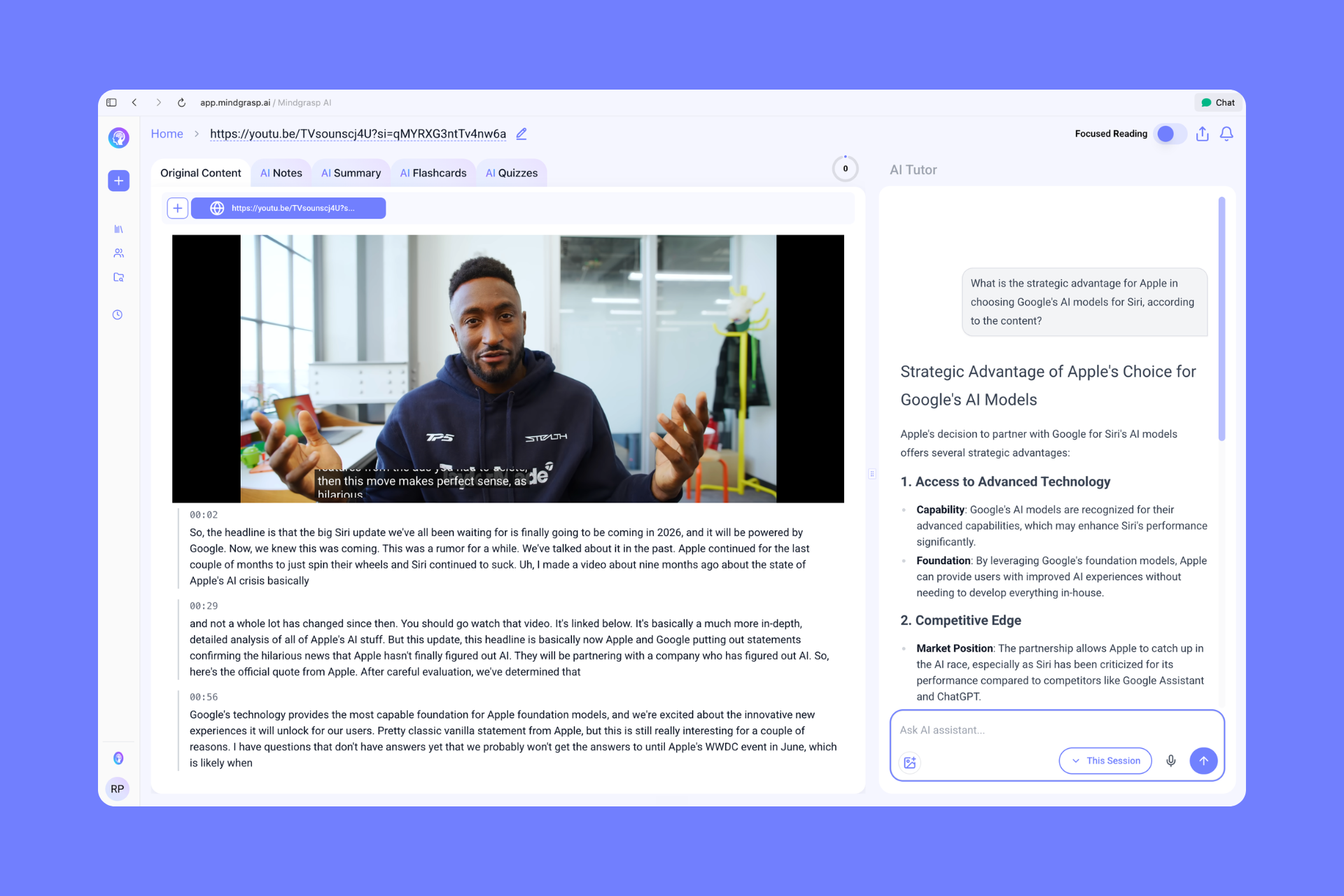
Mindgrasp AI is designed specifically for academic environments. It excels when you have a mixture of YouTube links, uploaded lecture audio, Zoom recordings, and PDF slide decks that need to be unified into study notes.
Standout Features:
Multi-Modal Document & Video Processing: Analyzes audio, visual slides, and spoken words together.
Auto-Generated Study Guides: Creates comprehensive textbook-style chapter summaries from video courses.
Bionic Reading Mode: Formats generated notes with bionic reading highlights to increase reading speed.
Pros:
✅ Great for processing 3-hour university lecture recordings.
✅ Can read both video audio and on-screen presentation slides.
✅ Generates comprehensive study packs.
Cons:
❌ Expensive monthly subscription compared to competitors.
❌ Clunky browser extension workflow compared to dedicated extension-first tools.
Best For: University students handling a combination of Zoom lecture recordings, slide decks, and YouTube seminars.
🧭 Buyer's Guide: How to Choose the Right YouTube Note-Taking Tool
Before picking a tool, identify your primary learning objective:
                                [ What is your primary goal? ]
                                               │
               ┌───────────────────────────────┼──────────────────────────────┐
               ▼                               ▼                              ▼
     [ Quick Video Skimming ]      [ Active Study & Retention ]      [ Syncing to Notion/Obsidian ]
               │                               │                              │
          ▼ Choose:                       ▼ Choose:                      ▼ Choose:
         Eightify                      Gistr or NoteGPT                 Annotate.tv
1. Are you skimming or synthesizing?
If you just want to know what a video is about in 30 seconds, pick Eightify.
If you want to deeply understand, reference, and build upon the content, pick Gistr.
2. Do you need multimedia context?
Most note-taking tools only store text. If you are learning coding, math, design, or science, you need playable video clips and diagrams. Gistr is the only tool that embeds interactive video moments directly in the editor.
3. What is your note-taking input style?
Typing & Keyboard Shortcuts: Gistr or Annotate.tv.
Voice & Dictation: Gistr (with built-in voice notes & audio player).
Automated Flashcards: NoteGPT or Mindgrasp AI.